
 Spark
Spark NeuralBot
 NeuralVault
 NeuralVault comes with it
This PC · NeuralSpark 8.0
Close to hand, all day.
The small doors matter. A tray icon that says NeuralBot is awake, a key that asks from anywhere, a right-click in File Explorer, and notices that land where the work is.

Tray icon
NeuralBot is awake, by the clock.
Left-click opens NeuralBot. The menu shows Open NeuralSpark, Open NeuralBot, Pause Telegram, Start with Windows and Quit NeuralBot. Close the window and, while NeuralBot has something to do, the first close tells you it is still awake.

Close the window · Demo
The tray icon stays. NeuralBot is awake.
Morning brief fires. The result arrives on the phone, outside quiet hours.
The missed routine runs once on wake, marked late. Older than 12 hours, it is said and left.

 Real capture to come
Quick Ask · Alt+Shift+Space
Ask without switching windows.
A small box over your current work. This window adds a picture of it, or the saved Office document itself for Word, Excel and PowerPoint. The answer becomes a full conversation.

File Explorer
Right-click a file or folder, Ask NeuralSpark about this, and a new Chat opens with About the file already in the box. Up to 30 items.
Windows Hello lock
Saved passwords, locked chats and private notes ask Hello first. Cancel and it stays locked, and says why.
Bell and badge
Task finished, needs your OK, has a question. The bell keeps 40 notices for a week. The taskbar badge counts what needs you, 1 to 9 then 9+.
Browser extension
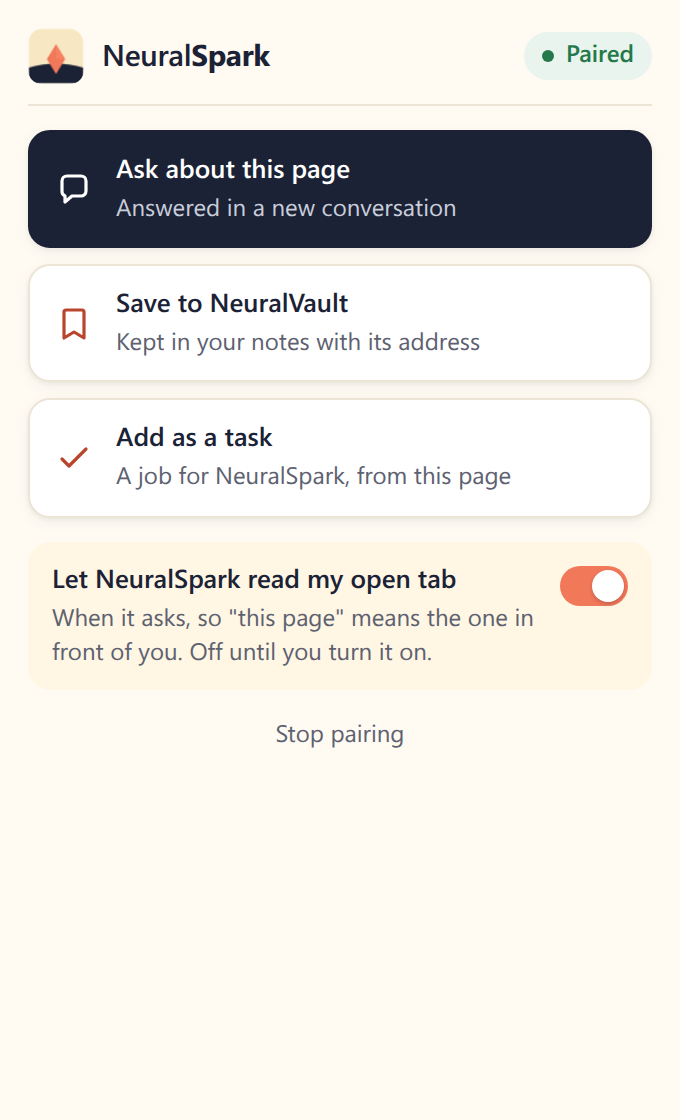
Ask about this page, Save to NeuralVault, Add as a task. It talks only to 127.0.0.1 on this PC, and only reads your open tab while you leave that tick on.

 Real capture to come